


As much as I love using Samsung phones, I can’t ignore just how many apps come pre-installed on them. And it’s a big problem. Of course, some of these are genuinely useful, like Calendar, Gallery, My Files, Samsung Internet, and Samsung Keyboard. But then there are others that don’t add much value and are basically dead weight.
So I went around disabling apps like Samsung Global Goals, Gaming Hub, My Galaxy, Samsung Shop, and a few others. It took some time, but it was well worth it because my phone feels way less cluttered now.

5 features I disable on Samsung phones before I do anything else
Stop your Galaxy phone from tracking, interrupting, and slowing you down.
Bixby
No surprises here

It’s no secret that Bixby has always lagged behind Google Assistant. With Gemini, though, it doesn't even feel like much of a competition. Yes, Bixby is still great at handling on-device commands like opening the camera and skipping songs, but Gemini is a complete package. It can do most of those things Bixby can and is far better at answering questions. And, of course, there’s Gemini Live, which takes things to another level.
The biggest reason I prefer Gemini over Bixby is the ecosystem. I already use Google’s apps and services, which means Gemini can directly pull relevant data from my Drive, Gmail, Keep, and even Photos. All of this makes Bixby feel redundant to me.
Samsung Global Goals
Noble intentions, but it’s not everyone
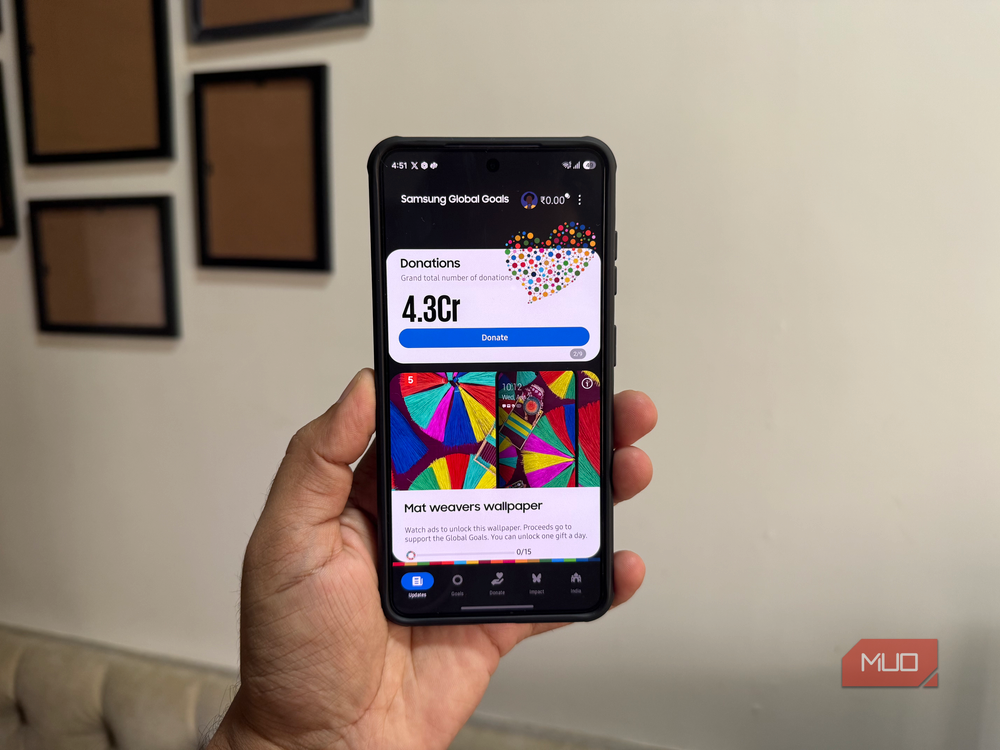
Samsung Global Goals is a result of a partnership between Samsung and the United Nations Development Programme (UNDP). The app basically tries to raise awareness about the UN's Sustainable Development Goals through educational content. It also shows ads on the lockscreen, and the revenue generated from it goes to the charity of your choice.
To be fair, I wouldn’t blame Samsung for this because it’s genuinely a noble idea. But seeing ads on my lock screen 24/7 isn’t for me, so removing Global Goals was an easy decision.
Gaming Hub
It’s more like advertising hub
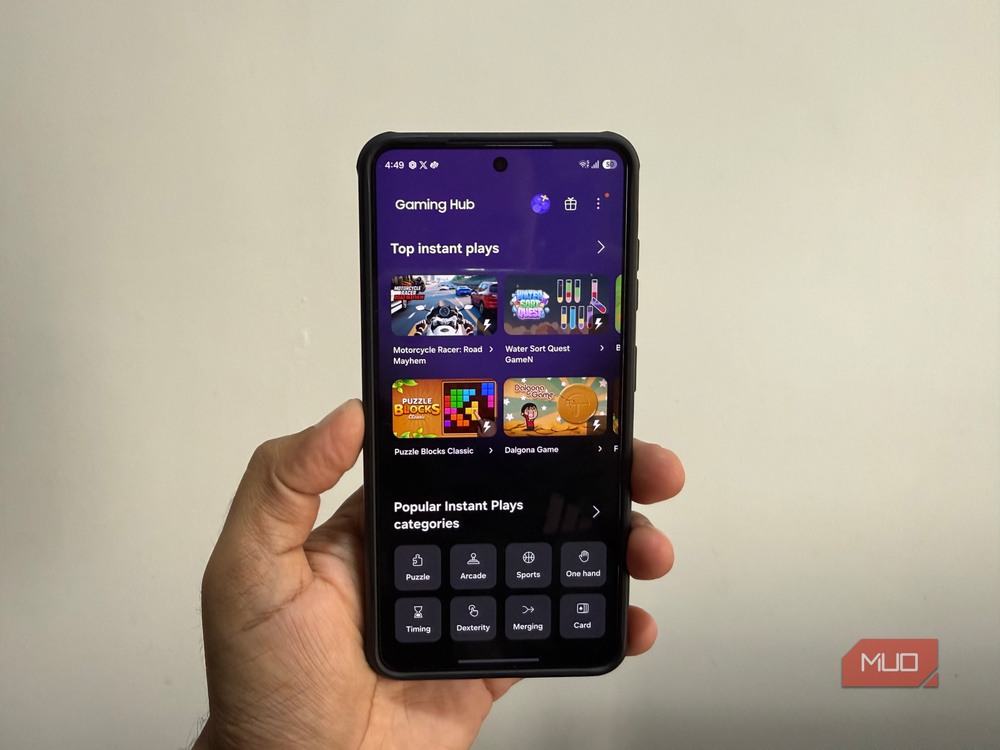
Honestly, I can’t think of a more useless app than Gaming Hub. It essentially acts as a central hub for all your installed games. It also lets you track your game history and even discover new games.
For someone like me who doesn’t use their phone for gaming, this obviously doesn’t add any value. But even if you’re an avid gamer, I doubt you’d miss Gaming Hub much because it doesn’t offer anything valuable. If anything, you’ll find Gaming Hub pushing promotional content and sometimes even sending a notification about a new game. So yes, using Gaming Hub largely means putting up with ads on your Galaxy phone.
Samsung News
A Discover alternative that never worked

Samsung News is Samsung’s answer to Google Discover. It promises to keep you updated with local and global news in a friendly way. You can add the topics and sources you care about, and it’ll try its best to serve you relevant stories.
But the thing is, I’ve already been using Google Discover for years, and at this point it knows my interests too well. The only reason I gave Samsung News a shot was because it’s integrated with Now Brief. I liked the idea of having news woven into Now Brief, but I could never get myself to like it over Discover. The recommendations simply weren’t relevant to me.
My Galaxy and Samsung Shop
More marketing than utility

My Galaxy is one of those pre-installed apps you’ll probably never notice unless you go looking for it. Its main purpose is to help you discover deals and offers on Samsung devices. You can even use it to upgrade your existing phone and manage your Samsung Care+ plan.
Samsung Shop is pretty similar in spirit. It’s a storefront for exploring Samsung’s latest phones, TVs, appliances, and other devices. Making a purchase from Samsung Shop also earns you reward points, which you can redeem later. For me, both apps feel like marketing channels, so I ended up removing them.
Samsung Members
Little everyday value
Samsung Members is probably the one app on this list I hesitated to disable. It's the best way to stay up to date with company news and community posts if you’re into that kind of stuff. It’s also the only way to enroll in One UI Beta programs and try out newer versions of Android before they’re released to everyone else.
Its most useful feature, though, is the diagnostics tool. I’ve used it in the past to check if everything on my phone was working properly. You can use it to test the speakers, sensors, charging port, touchscreen, camera, and even battery health. Even so, I couldn’t find a strong reason to keep it around. If I need to use its diagnostic tools in the future, I can simply redownload the app.
There are plenty more…
Honestly, the above list is just a starting point. Galaxy phones ship with plenty of apps that feel useless. Smart Tutor, Samsung Kids, Samsung TV, Tips, and similar other apps just sit on most people's Galaxy phones. If you don’t want to stop at disabling these, it’s also possible to remove these pre-installed apps entirely with a bit of work.
Samsung Galaxy S26
- SoC
- Snapdragon 8 Elite Gen 5
- Display
- 6.3-inch Dynamic AMOLED 2x
- RAM
- 12 GB
- Storage
- 256 or 512 GB