


What's more interesting than NotebookLM is the concept behind it. A large language model rooted and grounded strictly on your material sounds really powerful, and it indeed is. NotebookLM started as an experiment, when a group of Google researchers decided to see what they could do with RAG. But once it grew in popularity and received more features as a result, it wasn't long until it became its own full Google product.
NotebookLM deserves the praise it has received, but in the end, it is a proprietary closed-source tool. The concept of NotebookLM can go way beyond what NotebookLM offers right now, or ever will. No matter what your workflow is, your queries in NotebookLM will always use the cheapest Gemini model. And although Google has allowed a degree of customization recently, the Studio content, like the summaries and data tables, will always have a system prompt that's set by Google, not you. The Audio Overview podcasts will have the same two hosts, and always abide by the system prompt that Google has set.
To this day, NotebookLM is a one-of-a-kind tool. No response has come from other big AI companies. But even if we had one, it wouldn't be any different — it would just be limited to what Anthropic or OpenAI have baked into it.
With all of that said, imagine my excitement when I came across the ultimate NotebookLM alternative. Not from Anthropic or OpenAI, but from a single maintainer, available freely on GitHub.
Meet Open Notebook
An open-source NotebookLM

Open Notebook is a project by developer Luis Novo, available freely on GitHub. It does what NotebookLM does. You upload sources, chat with them, ask questions, generate summaries, and even make podcasts.
Open Notebook is an interface. It has the code to do all of this, but it doesn't provide the AI models. With NotebookLM, you get Google's Gemini. With Open Notebook, you get nothing — which is fantastic.
Because that means you can hook up whatever model you want. This includes providers like OpenAI, Google, Anthropic, Groq, Mistral, DeepSeek, Azure, and — to top it all off — OpenRouter and OpenAI-compatible endpoints.
Those last two are worth noting. With OpenRouter, you can access almost every LLM and pay as you go. One API key, and you have them all. I use this. But I also have Gemma 4 running on my own machine. That OpenAI-compatible endpoint here lets me plug local language models straight into Open Notebook.
With a local model, you can set your own system prompt, adjust how the model is loaded, and control the temperature and other parameters. You can even train your own model and load it in. And with a local model, your notebook works offline, and none of your data ever leaves your machine.
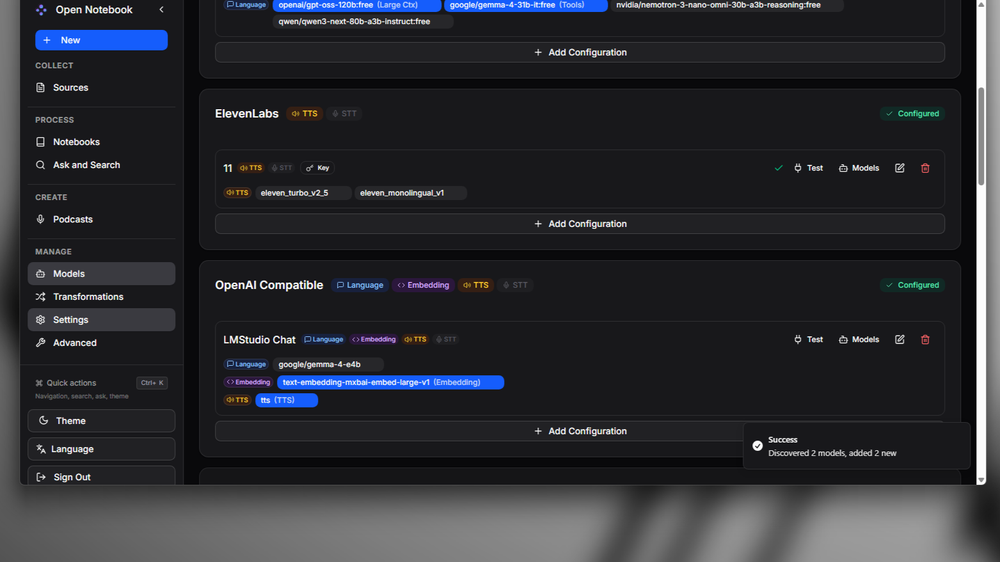
That said, I don't have a supercomputer. My local model is never going to match the big cloud models — and I didn't want Open Notebook to be a compromise. I wanted it to be an upgrade. If you have a capable system, it is. But for me, I stuck with cloud models through APIs.
What does that get me? The same setup as NotebookLM, except instead of a cheaper Gemini model answering my queries, I can see what Claude Opus 4.8 has to say about them. I can have a frontier model write the podcast transcript.
The model for each aspect of the tool is configurable independently. You can assign a specific model to one transformation and a different one to another, depending on what fits best.
If you're going to use it with a local model, you'll also need to host an embedding model on your machine. It's tiny, so don't worry about it.
Fully customizable transformations
The NotebookLM Studio equivalent
Open Notebook's Transformations are roughly equivalent to the text features in NotebookLM's Studio. These are preset prompt actions you can apply to a source with a click — dense summary, key insights, paper review, and so on. You can edit all of them, with no hidden system prompt, and you can create your own from scratch.
You can also set a default Transformation that runs automatically on every source you upload. I have mine set to dense summary, so when I add something to a notebook, it gets embedded and immediately summarized without any extra steps.
You can take this much further with custom Transformations. For instance, you could create one that looks for ideas connecting to a specific topic — say, astrophysics — then upload a batch of papers and have it run across all of them. It surfaces the relevant threads across every source automatically.
It's really something.
Fantastic podcasts
They're better than NotebookLM
NotebookLM took the world by storm when it introduced its podcast feature — that's what made it mainstream. Podcasts are bigger than ever, because we always want to learn more without the effort of actually sitting down to read and study. And with NotebookLM, we have podcasts about exactly the topic we want.
With Open Notebook, I can have podcasts that not only cover the topic I want, but cover it in exactly the way I want. The customization puts NotebookLM to shame.
To generate a podcast, you'll need a speech model. You can host one yourself or connect one through API providers like OpenAI, OpenRouter, or ElevenLabs.

Where NotebookLM has two fixed hosts, Open Notebook lets you add as many as you want. Each speaker gets a full profile — their background, expertise, and viewpoints. From there, you can assemble panels. It comes with presets: the tech_review panel, for example, includes two technically-minded speakers who focus on the technical aspects of the material. I made a panel of two philosophers from different schools of thought and had them debate each other based on my journal entries.
You can set the voice for each speaker, and you can use different speech providers for different speakers — one from OpenAI, another from ElevenLabs, for instance.
But the best part isn't the voices. It's that you decide what model writes the podcast script. You can go ambitious and use Opus 4.8 for it. And since you have full control over the prompt, you can shape the output exactly to your requirements. It's just a matter of how well you can prompt it.
The ceiling is yours now
Use it well
Open Notebook takes the concept from NotebookLM and pushes it further than NotebookLM ever did. You get enough control that what you make of it is genuinely up to you.
It's available via Docker, with a straightforward setup and minimal configuration required out of the box. It's hooked me for all the text and voice use cases I had from NotebookLM, and for me it's simply the better tool — because of the control. That said, it won't accept image or video models, so it can't generate slide decks or summary videos. It also can't generate mind maps, though you could have it output the JSON for one and import that into a separate mind map viewer.
Since you bring your own model and write your own prompts, the blade cuts both ways. The ceiling is high — you can use frontier models from any provider, for both speech and text. But the floor is lower too. A poor prompt or a weaker model will produce results worse than NotebookLM's defaults. The tool is only as good as what you put into it.