


I've switched almost every device in my workflow over to USB-C in one way or another. The easy part was buying new cables, but the hard part was modding my iPod Classic to add a USB-C port or finding a camera battery with USB-C charging for my mirrorless Sony camera. Eventually, you get far enough into the USB Type-C transition and realize that the port and connector simply can't replace everything.
No matter how hard you try, there will be a handful of specialized cables that offer something a Type-C cable does not. As I've dabbled in the premium audio, home theater, and networking spaces, these are the five cables USB-C can't replace.

I finally learned which ports to use on my TV and AV receiver, and it fixed my setup
Your AV receiver has a ton of ports, and this is your guide to using each one.
XLR cables
These are thick, durable, and balanced audio cables

XLR cables are used by musicians, recording studios, home theater enthusiasts, and audiophiles alike. While USB-C cables can carry audio, there are a few features that make XLR superior for professional audio workflows. Crucially, XLR cables are balanced, and this means they can cancel out electromagnetic noise and interference. They are thick, long, and use a locking latch that ensures XLR cables never become accidentally unplugged. XLR uses a three-pin setup with a ground and shielding wire, a positive wire, and a negative wire.
The size and heft of XLR makes it a more durable cable than USB-C, and it can carry audio signals roughly 100 feet before signal quality degradation even becomes a concern. USB-C, by comparison, is weaker, unbalanced, lacks a locking latch, and can't run over the same distances as XLR. In other words, XLR cables aren't being replaced by USB-C.
HDMI cables
Features like eARC make USB-C's DP Alt Mode inferior
HDMI is still a more robust video and audio connectivity protocol than USB-C or Thunderbolt, but it's not like the USB IF hasn't tried. DisplayPort Alt Mode is ingrained into the USB4 standard, so USB4 Type-C cables can be used to connect display inputs and outputs over DisplayPort. There was also HDMI Alt Mode, a failed USB-C mode that aimed to bring exclusive HDMI features such as the Audio Return Channel (ARC), the HDMI Ethernet Channel (HEC), and Deep Color to Type-C cables. That didn't work out, and there were no consumer cables supporting HDMI Alt Mode ever released.
So, those HDMI-exclusive features are still unavailable using USB-C cables. ARC and eARC allow HDMI cables to share audio signals in both directions while simultaneously sending video information to your TV. This is used for home theater setups, as a single HDMI cable can be used to send TV audio to soundbars and A/V receivers without a dedicated optical audio or coaxial audio cable. Meanwhile, the HEC adds 100Mbps bidirectional internet sharing to the existing audio and video data shared by HDMI cables.
There's no direct equivalent for features like ARC or eARC available as part of the USB-C standard, and HDMI is still required for many home theater setups as a result.

Toslink cables
These audio cables are fortified against electromagnetic interference

Toslink cables, more commonly known as optical audio cables, are still used instead of USB-C for many of the same reasons as XLR. Unlike XLR, Toslink cables send digital audio signals using fiber-optic technology. Optical audio cables are isolated from interference, such as electromagnetic noise, making them superior for audio transmission compared to USB-C. They eliminate ground loop noise, which creates speaker hum, buzz, or hiss.
Optical audio cables aren't as widely used as they once were, because HDMI's ARC feature eliminates the need to run a separate Toslink cable from a TV to a soundbar or A/V receiver. However, they're still ideal for situations where you want to send a digital signal without an analog conversion to another device free from interference or noise. USB-C is digital, but it lacks the isolation of Toslink. I still use optical audio cables to connect my CD players to a desktop DAC, and USB-C can't replace them.

Why I still keep an optical audio cable in my drawer
I don’t use an optical cable often, but when I do, I’m grateful it’s there.
AC power cables
240W USB-C is nice, but it won't replace AC cables anytime soon

The latest USB4 Type-C versions include USB PD as a mandated inclusion, with support for up to 240W of power delivery. This has completely eliminated the need for certain proprietary chargers or power supplies. I review Windows laptops, and I only see proprietary barrel-jack power connectors sparingly on the most demanding portable gaming machines available. Everything else uses USB-C for charging. In fact, I've tested a mini PC that uses USB-C for power, rather than a traditional power cord.
So, could USB-C replace power cords across the board? Although USB-C's power delivery support is impressive, the answer to that question is a resounding "no." USB-C cables use Direct Current (DC) to provide power, whereas many computers and appliances use Alternating Current (AC) power directly from the wall at up to 240V. That's a far cry from USB-C's 240W DC support, and this is why you shouldn't expect USB-C to replace AC power cables anytime soon.
Ethernet cables
USB-C can handle Ethernet, but not like an RJ-45 cable
Although you can use USB-C cables and adapters to connect devices to a network, they won't replace Ethernet. There are many reasons for this, and most of them have to do with safety and practicality. Ethernet cables use locking clips to ensure they won't come loose, and leverage galvanic isolation at each end to block the electrical path between connected devices. If there's a power surge or electrical currents deviating from their intended path, these electrical signals won't hit the devices at each end of the Ethernet cable. Since USB-C is designed to transfer power and data, Type-C cables don't include similar safeguards.
Ethernet cables are more rugged and network signals can survive much longer cable runs than USB-C. Signal degradation only becomes an issue for Ethernet at around 100 meters, making it ideal for lengthy in-wall networking runs. Meanwhile, USB-C excels in short, point-to-point connection workflows.
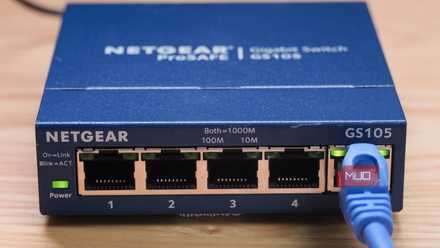
I never use Wi-Fi for these 4 tasks, and using Ethernet instead saves me hours each week
I don't try to run Ethernet cables to every device in my home. Instead, I use it for specific tasks, and I save time in the process.
USB-C can be used for almost everything
There are far more cables USB-C can replace than those it can't. I use Thunderbolt 4 cables throughout my entire setup, adapting the Type-C hardware interface to older standards like Thunderbolt 2, Mini DisplayPort, and even FireWire 800. However, I still use optical audio, HDMI, and Ethernet cables throughout my setup, and that likely won't change anytime soon.

Satechi USB4 V2 Pro Cable
- Brand
- Satechi
- Cable Type
- Works with Thunderbolt 4, Thunderbolt 3, USB4, USB 3.2/3.1/3.0/2.0
- Length
- 3.9 ft / 1.2m
- Data Transfer Rate
- 80Gbps bidirectional
- Charging Rate
- 240W
- USB Version
- USB4 Version 2.0
The Satechi USB4 V2 Pro cable is a high-end USB cable supporting 80Gbps bidirectional data transfer and up to 240W charging speeds. The cable also supports an external display at up to 8K at 120Hz or 4K at 240Hz. It's backwards compatible with Thunderbolt 4, Thunderbolt 3, USB4, and USB 3.2/3.1/3.0/2.0.