


Modern televisions are amazing. Pin-sharp 4K pictures! Incredibly vivid colors! Pristine HDR presentation! Yet even if your smart TV has an Ethernet port which makes streaming noticeably better, both your set’s physical internet slot and its ability to tap into quality Wi-Fi are probably hobbled by default. The fact of the matter is this: TV manufacturers don’t much care if the displays they’re making are rocking crappy broadband connections.
While it’s true, you don’t need super-fast Wi-Fi or an ultra-speedy Ethernet port to stream 4K content on Amazon Prime Video or Netflix, if you’re solely relying on your TV’s internal networking to run high-end game streaming services like Nvidia GeForce Now, lag and stuttering is all but guaranteed. Let’s get into why your TV’s broadband most likely sucks.
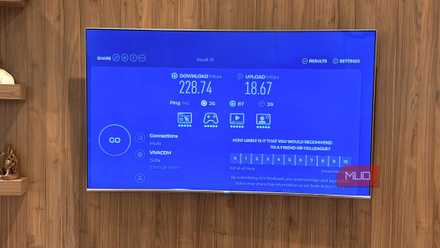
I accidentally added a gigabit Ethernet port to my smart TV
Your TV's Ethernet port is probably stuck at 100 Mbps. Mine accidentally got 1000 Mbps. It doesn't make a difference.
Your TV’s network connections are probably slow
Hardware compromises are normally to blame

In an ever-escalating war between the best and brightest LCD sets and the most vibrant OLED panels, the last question many folks are likely to ask is, “how fast is my TV’s internet hardware?” Viewed through that lens, it’s no surprise TV companies don’t break the bank trying to improve the speed of the Wi-Fi and Ethernet connections of their products.
The fact that many TVs’ Wi-Fi and Ethernet quality remains subpar is largely a cost-cutting matter, which I’ll touch upon shortly. It’s not simply a case of manufacturers being cheapskates, though. Other bottlenecks can also compromise the network connection on your display.
Aging Wi-Fi chipsets are often used in budget televisions, while manufacturers regularly opt for Fast Ethernet (that tops out at 100Mbps) over Gigabit Ethernet (1Gbps speeds). Reducing the prices of components invariably leads to poorer connectivity, and it’s long been the case that TV makers don’t place huge amounts of value on top-tier Wi-Fi or Ethernet options.
Even if your TV was capable of supporting an ultra-fast Wi-Fi chip, your TV likely has other internal issues that are affecting the quality of its network connections. Unless you own a really high-end television you bought within the last couple of years, your set probably has a pretty slow CPU, coupled with limited RAM. Combine these two hardware restrictions, and that impacts the speed of your TV’s networking options.
Why do TV manufacturers cheap out on connections?
Cutting costs means more than delivering speedy internet
Why do TV manufacturers skimp on Wi-Fi and Ethernet hardware? The almighty dollar. Modern televisions don’t really need cutting-edge network connections, simply because most forms of streaming are still relatively low bandwidth.
Even the best 4K content on Netflix normally tops out at around 25Mbps. That’s why I kept my 4K Blu-ray player while everyone switched to streaming. Simply put, 4K discs support far higher bandwidth than streams.
When it comes to the demands of modern 4K streaming, TV makers know they can easily get away with sub-100 Mbps connections. Until studios start to produce content that outputs at superior bitrates, the likes of LG, Samsung, and Sony aren’t going to feel compelled to improve their displays’ network options. After all, when was the last time you bought a TV for anything other than its resolution, refresh rate, or underlying tech (like OLED or Mini LED)?
Until the big streamers start putting out content with considerably higher bitrates, which subsequently necessitate higher bandwidth, Wi-Fi and Ethernet chips in TVs are unlikely to improve.
I’m semi-willing to give TV manufacturers a bit of a break on this front. In an increasingly competitive market, where profit margins have been historically thin, I’d rather the big players in the television space “cheap out” on built-in Wi-Fi when overall picture quality and peak HDR brightness levels are far more important to the overall viewing experience.
Does it really matter if your TV's Wi-Fi is slow?
In most cases no, but...

Dealing with compromised hardware is rarely ideal. In the case of many modern TVs’ slow networking connections, it’s normally fairly easy to find workaround solutions.
Like I previously pointed out, whether you’re watching 4K movies on Netflix, Disney Plus, or Amazon Prime Video, current Ultra HD streams will rarely demand more than 35Mbps of bandwidth. That means for many Fast Ethernet-enabled TVs, the max 100Mbps output really isn’t an issue.
If the only real networking demands you ask of your TV revolve around streaming content, Wi-Fi and Ethernet speed restrictions likely won’t get in the way of your fun … unless you somehow travel back to 1998 and find yourself using an AOL 56k dial-up connection.
There are exceptions, of course. If you’re a Plex user and regularly stream Blu-ray quality content that can go over 100Mbps, a sluggish Wi-Fi or Ethernet connection could cause image dips and buffering issues. Likewise, some major TV firmware updates can be several gigabytes in size, meaning slow networking could lead to glacial download times.
Regardless of whether these 4 devices are on Wi-Fi or Ethernet, you’re always better off choosing an external device with access to Gigabyte Ethernet for those times you need to tap into the fastest speeds your broadband is capable of. That’s especially true if you want to stream 4K video games with acceptable lag.
TV companies continue to cheap out on network connections
There are a bunch of reasons why TV makers are seemingly happy to go the skinflint route when it comes to your set’s networking hardware. With the main streaming services not requiring huge amounts of bandwidth to generate 4K results, Ethernet ports that top out at 100Mbps, and subpar Wi-Fi chipsets that appear to be a partial response to weak smart TV processors, it’s no wonder your television’s hardware options are suboptimal. If you want to stream games through your set in 4K and at high settings, you should definitely connect to an external device.
LG evo AI C5 OLED TV
The LG evo AI C5 OLED TV is a solid buy for those looking for a relatively affordable but powerful and gorgeous looking OLED TV. With lots of built-in technologies to combat burn-in, it's not as big a problem as it was in the past.